Guest parking permits in seconds.
If you live in a City of Atlanta residential permit zone, GuestPermits fills in and submits the City's guest permit form for you. Save your account details and your guests' vehicles once (using your phone camera). After that it's pick the car, pick the days, tap Create.
How it works
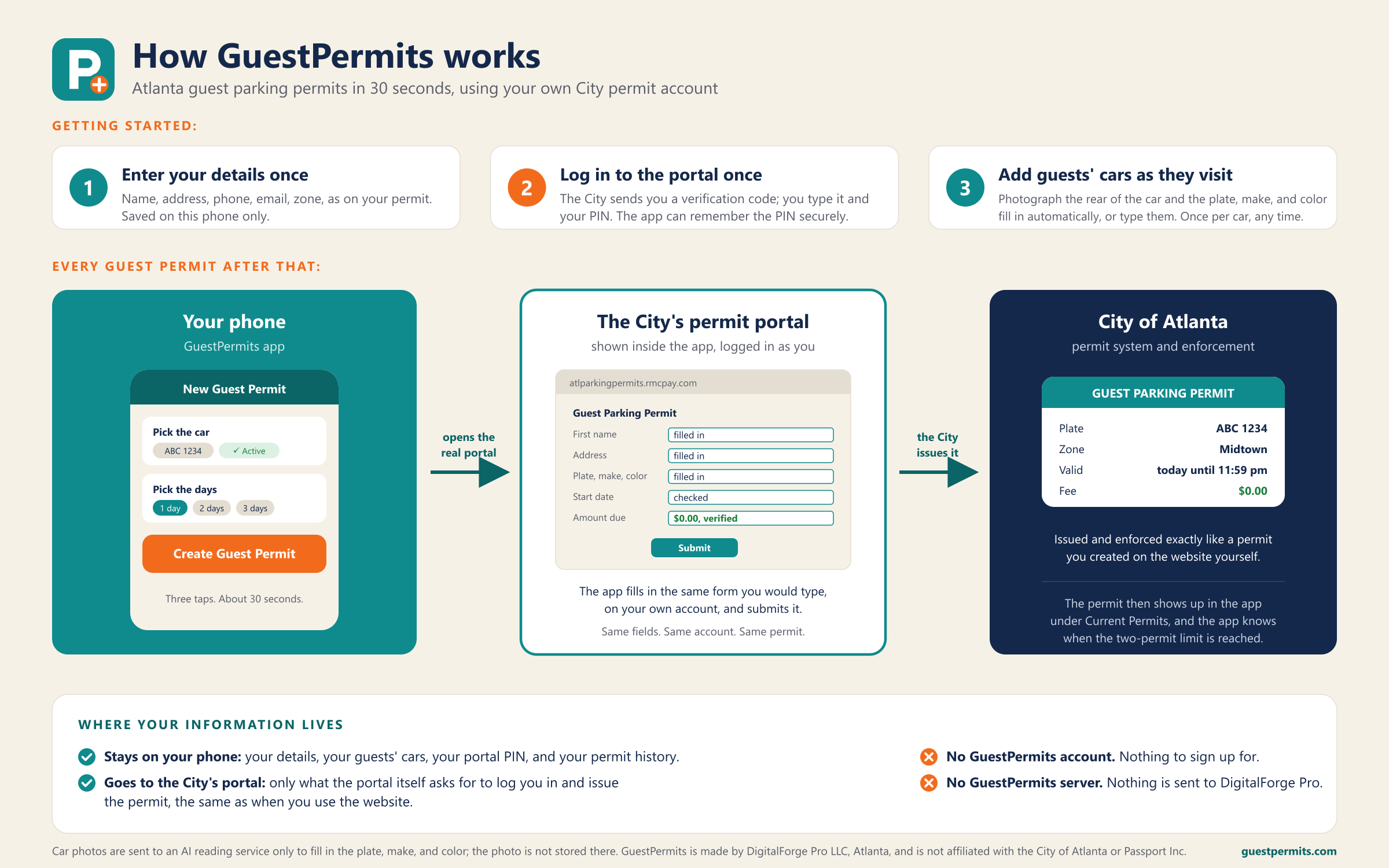
Set up once. Enter your details as they appear on your residential permit. That's the only setup.
Add cars as guests visit. Save each guest's vehicle with a name you'll recognize, like "Mom" or "Aunt Judy". Snap a photo of the rear of the car and the app reads the plate, make, model, and color, or type them in.
Every visit. Pick the vehicle, the zone, and how many days. Tap Create. GuestPermits opens the City's permit portal, logs in as you, fills in the form, checks that the permit is free, and submits it. You see the confirmation with the permit's dates.
Your data stays with you. There is no account to create with us and no server holding your information. Everything is stored on your phone. Read the privacy policy.
Good to know
- You need an existing City of Atlanta residential parking permit account at atlparkingpermits.rmcpay.com.
- The City allows two active guest permits at a time. The app tells you when you've reached that limit.
- Guest permits are free. The app never submits an order with an amount due.
- Works with every City of Atlanta residential permit zone.